Comparison / 7 min read / ChatGPT email design
ChatGPT for Email Design: What It Can and Can't Do
ChatGPT writes great email copy, but its HTML breaks in Outlook, its images aren't hosted, and it forgets your brand. Where it fits, and what to use instead.
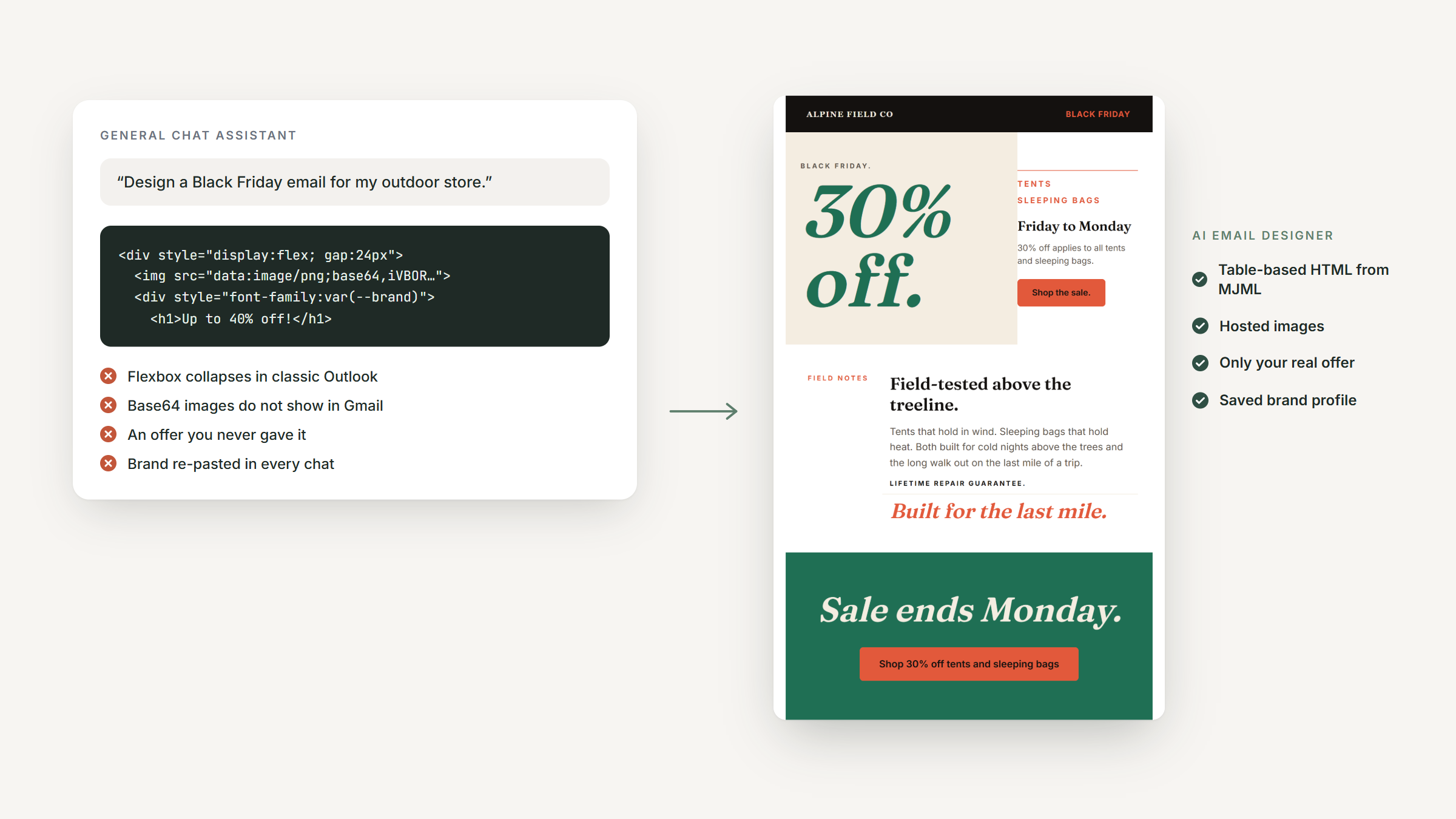
Ask ChatGPT to "design a product launch email" and you get something impressive in seconds: a subject line, a headline, body copy, and often a block of HTML. Paste that HTML into a browser and it may even look good.
Then you send a test. The columns collapse in Outlook. The images are missing in Gmail. The button is a blue underlined link on one phone and a box on another. The brand colours are close, but not yours.
ChatGPT is a very good writing partner for email. It is not an email design tool, and the gap shows up exactly where it costs the most: in the inbox.
What ChatGPT does well for email
Credit where it is due. For the words in an email, ChatGPT is fast and flexible.
- Subject lines and preview text. Ask for 20 options in different tones, then pick and edit. This is one of the best uses of any language model.
- First-draft copy. Headlines, body text, product descriptions, and button labels, in whatever voice you describe.
- Campaign ideas. Angles for a slow month, themes for a seasonal sequence, ways to reuse one product story across five sends.
- Rewrites. Shorten, simplify, translate, or change the tone of copy you already have.
- Explaining email concepts. What a preheader is, why Outlook behaves differently, what MJML does.
If your workflow is "ChatGPT writes, a designer builds", ChatGPT is earning its place.
Where ChatGPT breaks down for email design
The problems start when the output must be real email HTML that renders in real inboxes.
1. Email HTML is not web HTML
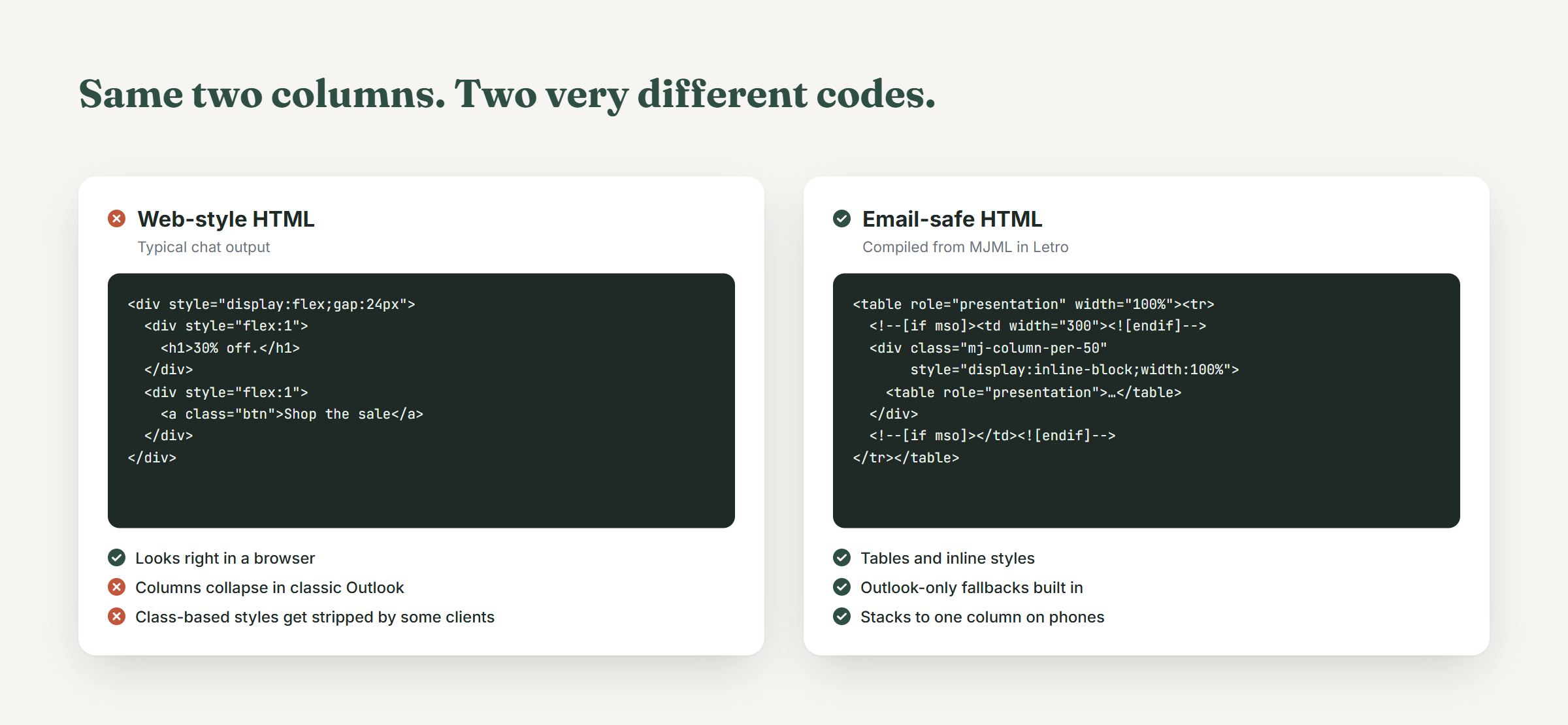
Email clients are far behind web browsers. Classic Outlook for Windows still renders email with Microsoft Word's engine, which ignores much of modern CSS: no reliable flexbox, no grid, patchy support for margins and background images.
Production email code is built with nested tables, inline styles, and Outlook-specific fallbacks. ChatGPT can write that kind of code if you ask very precisely, but by default it often writes modern, web-style HTML with divs and flexbox. That looks fine in a browser preview and breaks in the inbox.
This is the main reason email teams use frameworks like MJML: MJML compiles simple markup into the table-based HTML that email clients need, so nobody has to hand-write Outlook fallbacks.
2. Images have nowhere to live
An email can only show images that are hosted at a public URL. ChatGPT can generate images, but it does not host them for your email.
Many email clients, Gmail included, do not show images embedded directly in the HTML as base64 data. So you must download every image, upload it to your ESP or a CDN, and replace each link by hand. For a five-product email, that is a lot of copying and pasting.
3. Your brand resets every chat
ChatGPT does not hold a structured brand profile for your emails. You can paste your hex codes and fonts into each conversation, but nothing guarantees the same button style, logo size, or footer next week.
Across a campaign of several emails, small drifts add up: a slightly different red, a new font weight, a footer that changes. Subscribers notice inconsistency even when they cannot name it. Our guide to on-brand email design covers why this matters.
4. Every edit is a new prompt
Want to move the product grid above the story? Make the button bigger? Swap one image? In a chat, each change means describing it in words, waiting for the whole email again, and checking that nothing else changed.
Visual email builders exist because clicking a block and changing it is faster than explaining the change.
5. It can invent facts
Ask a language model for a "persuasive sale email" without giving it the offer, and it may supply one: "30% off", "free shipping over $50", a product name that does not exist. Every specific in a ChatGPT draft must be checked before it is sent. In a sale email, one wrong number is a customer-service problem.
ChatGPT vs. an AI email designer
| ChatGPT on its own | AI email designer (Letro) | |
|---|---|---|
| Subject lines and copy | Yes, excellent | Yes, written with your brand context |
| Email-safe HTML | Only if you prompt precisely and test yourself | MJML compiled to table-based HTML on every email |
| Outlook rendering | Often breaks with web-style HTML | Handled by the MJML output |
| Brand consistency | Re-paste your brand in every chat | Saved brand profile applied to every email |
| Images | Generated, but not hosted for email | Hosted media library, brand assets, optional AI images |
| Editing | Re-prompt the whole email | Visual block editor, plus chat on a selected block |
| Invented offers | Possible; check every specific | Only uses offers from your prompt or knowledge base |
| Export | Copy and paste the code | HTML or MJML for any ESP; draft campaigns in Klaviyo |
A practical workflow that uses both
You do not have to choose. Each tool is best at a different step.
Step 1: Brainstorm in ChatGPT. Campaign angles, subject line options, a rough message hierarchy. Fast, cheap, low-risk.
Step 2: Decide the facts yourself. The offer, the deadline, the products. These come from you, not from a model.
Step 3: Generate the email in an email designer. Paste the facts and, if you like, the copy direction from step 1. Let the tool build the layout, apply your brand, and produce email-safe code.
Step 4: Refine visually. Fix the parts that are not right by clicking them, not by re-prompting the whole email.
Step 5: Export and test. Send a test to Gmail, Outlook, and a phone before scheduling.
The pattern is simple: language models are best at language, and email design is mostly a rendering problem. Use the chat model for the words, and a tool that understands email clients for everything after.
How Letro handles the parts ChatGPT cannot
Letro is an AI email designer built around the failure points above.
- Email-safe output. Every email is MJML, compiled to table-based HTML that renders across major clients, including Outlook.
- Brand on every send. Add your website under Brand once. Your logo, colours, and fonts apply to every email automatically.
- Real facts only. Upload your catalog and offers to Brand → Knowledge. A strategist step plans each email from your facts and never invents a discount.
- Hosted images. Use your media library, your brand assets, or optional AI-generated images, all hosted and ready to send.
- Visual editing. Click a block to edit it, or select it and ask the chat to change only that block.
- Export anywhere. Download HTML or MJML for Mailchimp, Brevo, Customer.io, and other ESPs, or create a draft campaign directly in Klaviyo.
FAQ
Can ChatGPT design an email?
ChatGPT can write email copy and produce HTML, but it is not an email design tool. Its default HTML is often web-style code that breaks in Outlook, it does not host images, and it does not keep your brand between chats. Use it for words and ideas, then build the email in a dedicated tool.
Is ChatGPT HTML safe to paste into Mailchimp or Klaviyo?
Only after testing. Your ESP will accept the code, but that does not mean it renders well. Send a test to Outlook, Gmail, and a phone first. Code built with tables and inline styles, such as compiled MJML, is far more reliable.
Why do ChatGPT emails break in Outlook?
Classic Outlook for Windows uses Microsoft Word's rendering engine, which does not support much of modern CSS, such as flexbox and grid. ChatGPT often uses these by default. Email-safe code uses nested tables instead.
What is the best way to use ChatGPT for email marketing?
Use it for subject lines, preview text, copy drafts, rewrites, and campaign ideas. Keep the offer and product facts under your control, and use an email design tool for layout, brand, images, and the final HTML.
Is there an AI tool that designs the whole email?
Yes. AI email designers such as Letro generate the layout, copy, brand styling, and email-safe code together, and give you a visual editor to finish it. See our comparison of the best AI email design tools.